You do it at own risk
To install* a new crosshair u need:
※ Paint marker, color is not matter (Known issues with permanent marker)
Installation process
See attached pic
Done!
Benefit!
※ Green technology. No power required, save the Mr.Planet(do you want to upset Mr Planet? bas)
※ Works with many FPS games
※ Flexible customization
※ Almost free
* If you ruin your brand new 8k 666Hz gaming display, it's your fault. bas
Custom crosshair. How to
-
SΛLO POWEЯ

- Posts: 289
- Joined: Tue Sep 29, 2020 1:00 am
- Location: Kiev, Ukraine
- Contact:
Custom crosshair. How to
- Attachments
-
- D9194452-9D7E-40E6-8D28-A9E8EDF7CAD8.jpeg (660.18 KiB) Viewed 20629 times
Last edited by SΛLO POWEЯ on Tue Dec 08, 2020 4:21 am, edited 1 time in total.
Powered by S△LO
-
[ZG] BubblesDevere

- Admin 9

- Posts: 1240
- Joined: Sat Jul 09, 2016 7:41 am
- Location: Germany
- Contact:


-
SΛLO POWEЯ
- Posts: 289
- Joined: Tue Sep 29, 2020 1:00 am
- Location: Kiev, Ukraine
- Contact:
Re: Custom crosshair. How to
Jokes its good and fun. But it is realy problem for me and some players. Native crosshair is it barely visible, and painful for my eyes.

Exists two ways for fix this issue:
1.The hard way. Create a custom crosshair. You need to install font redactor tool and draw this. Of cource this way is not for us.
2.The simple way. Universal crosshair, usable for many shooter games. This is a overlay thing.
You need to install two applicatinon: Borderless Gaming and CrossOver.
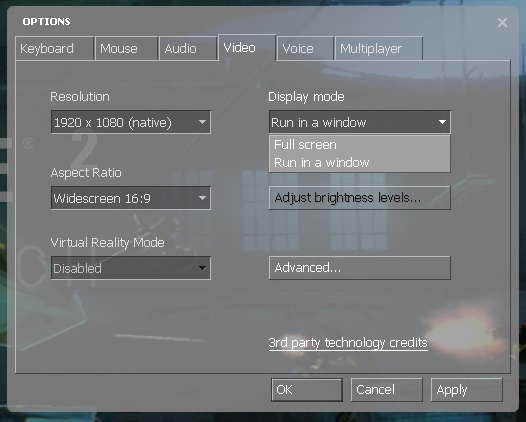
Next launch "Borderless Gaming", "CrossOver" and game, choose "Run in windows" in video settings.
Choose the game in the Borderless Gaming window.
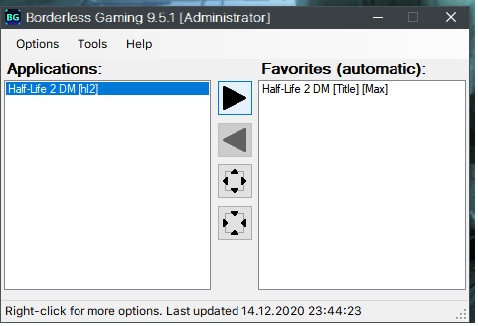
The game should be going to fullscreen.
Choose and customise crosshair in "CrossOver"

Press ctrl + alt + shift +x
May the painfulless be game!
Exists two ways for fix this issue:
1.The hard way. Create a custom crosshair. You need to install font redactor tool and draw this. Of cource this way is not for us.
2.The simple way. Universal crosshair, usable for many shooter games. This is a overlay thing.
You need to install two applicatinon: Borderless Gaming and CrossOver.
Next launch "Borderless Gaming", "CrossOver" and game, choose "Run in windows" in video settings.
Choose the game in the Borderless Gaming window.
The game should be going to fullscreen.
Choose and customise crosshair in "CrossOver"
Press ctrl + alt + shift +x
May the painfulless be game!
Powered by S△LO
-
SΛLO POWEЯ
- Posts: 289
- Joined: Tue Sep 29, 2020 1:00 am
- Location: Kiev, Ukraine
- Contact:
Re: Custom crosshair. How to
One more option:
Make a backup or rename a original HalfLife2.ttf file from:
Download and put modified HalfLife2.ttf

Make a backup or rename a original HalfLife2.ttf file from:
Code: Select all
\Steam\steamapps\common\Half-Life 2 Deathmatch\hl2mp\resourcePowered by S△LO
-
FougereDeGuerre
- Patron

- Posts: 6
- Joined: Sun Nov 29, 2020 11:21 pm
- Contact:
Re: Custom crosshair. How to
I don't know if you already searched the guide section in Steam, but there are already detailed documents on how to create custom crosshairs.
The following one tends to be complete, and explain also how you can have a diifferent cursor for each weapon, how to add an outline surrounding the cursor, ... : Crosshairs for HL2DM
Also, I think that your modified TTF shouldn't go in the folder you mention, this was the case years ago, before the creation and support of custom folder. According to me you should rather put your TTF
my_custom_stuff is just and arbitrary name, you can name that folder level as you want, but parent should be custom, and the sub-direectories should match the structure of the folders and files you aim to overwrite.
PS: if you double click on a TTF it will be installed in your system, and then it will take precedence on the one stored in the folder. Be sure to check that you didn't install the HL2 font on your system:)
On my side I didn't do it the hard way, I used HL2Customizer, a tool made by a french player Turanic years ago which handle all the stuff explained there in a few clicks. 2 Colors croshairs and a different one for earch weapon, just because we can
But I'm not sure it's still available on the web. The code for this is on it's GitHub, but I didn't see any upload link unfortunately.
PS 2: I'm not fan of your first option, with overlay of third party programs. But in the end I admit the programs you use there is not more than what it's done by tweaking the cursors and fonts in the game files.
The following one tends to be complete, and explain also how you can have a diifferent cursor for each weapon, how to add an outline surrounding the cursor, ... : Crosshairs for HL2DM
Also, I think that your modified TTF shouldn't go in the folder you mention, this was the case years ago, before the creation and support of custom folder. According to me you should rather put your TTF
Code: Select all
?:\Program Files (x86)\Steam\steamapps\common\Half-Life 2 Deathmatch\hl2mp\custom\my_custom_stuff\resourcePS: if you double click on a TTF it will be installed in your system, and then it will take precedence on the one stored in the folder. Be sure to check that you didn't install the HL2 font on your system:)
On my side I didn't do it the hard way, I used HL2Customizer, a tool made by a french player Turanic years ago which handle all the stuff explained there in a few clicks. 2 Colors croshairs and a different one for earch weapon, just because we can
But I'm not sure it's still available on the web. The code for this is on it's GitHub, but I didn't see any upload link unfortunately.
PS 2: I'm not fan of your first option, with overlay of third party programs. But in the end I admit the programs you use there is not more than what it's done by tweaking the cursors and fonts in the game files.

-
SΛLO POWEЯ
- Posts: 289
- Joined: Tue Sep 29, 2020 1:00 am
- Location: Kiev, Ukraine
- Contact:
Re: Custom crosshair. How to
Yes, I searched too much, but did not find any useful toolsFougereDeGuerre wrote:***
I gave up with the overlay option
I using custom folder, but font file in native place. Fonts not installed in system.
Unfortunately i found only source code on github, but no found releases. Dont know how build it.
Now i have colored custom dot (font file) with outline.
The way of GUI customization im started a month ago, without somehow knowleges and skill.
Anyway thank you.
Powered by S△LO
-
SΛLO POWEЯ
- Posts: 289
- Joined: Tue Sep 29, 2020 1:00 am
- Location: Kiev, Ukraine
- Contact:
Re: Custom crosshair. How to
Powered by SALO HUD
Outlined green crosshair.
Removed red screen when taking damage
Maybe some bugs and features
How to install:
Outlined green crosshair.
Removed red screen when taking damage
Maybe some bugs and features
How to install:
- 1.Create your custom folder in
2. DOWNLOAD and unzip in YOUR_CUSTOM_FOLDER 2 folders.
Code: Select all
\Steam\steamapps\common\Half-Life 2 Deathmatch\hl2mp\custom\YOUR_CUSTOM_FOLDER
it must looks like this3. If tou want remove ( ) around crosshair you need paste this code in your autoexec.cfgCode: Select all
\ hl2mp \ custom \ YOUR_CUSTOM_FOLDER \ resource scriptsCode: Select all
hud_quickinfo "0"
- Attachments
-
- 20210529082246_1.jpg (499.93 KiB) Viewed 20170 times
Powered by S△LO
-
SΛLO POWEЯ
- Posts: 289
- Joined: Tue Sep 29, 2020 1:00 am
- Location: Kiev, Ukraine
- Contact:
Re: Custom crosshair. How to
A new powered by SALO hud.
Features:
No damage red screen
Green outlined dot crosshair for .357, crossbow, pistol
Green outlined circle crosshair for AR2, shotgun, smg
Green outlined brackets crosshair for crowbar/stuntstick, gravity gun
Download
Unzip in the hl2mp folder
Features:
No damage red screen
Green outlined dot crosshair for .357, crossbow, pistol
Green outlined circle crosshair for AR2, shotgun, smg
Green outlined brackets crosshair for crowbar/stuntstick, gravity gun
Download
Unzip in the hl2mp folder
Powered by S△LO
Who is online
Users browsing this forum: No registered users and 2 guests